ROUNDUP
Best Handheld Gaming Accessories 2026: Cases, Docks, Power Banks, and the Cable That Saves You
The handheld accessories that genuinely improve daily use in 2026. Cases, docks, power banks, microSD, grip cases, audio. Device-agnostic picks for Steam Deck, ROG Ally X, Switch 2, and Legion Go S.

Three hours into a train journey. The Steam Deck is at 12 per cent. The Nintendo Switch 2 is at the bottom of your bag without a case, picking up grit. The dock at home never did make the picture crisp enough for the living room TV. None of that is the hardware’s fault. The handhelds in 2026 are genuinely capable, and the experience around them lives or dies on what you pair them with. The right accessories close the gaps the device ships with. The wrong ones add weight and cost without solving anything, and there is a lot of the wrong ones on Amazon.
How to Choose Handheld Accessories
Before buying anything, ask what the actual gap is. Battery anxiety is one problem. Travel concern is another. Sofa-to-TV picture quality is a third. Wrist fatigue on a two-hour session is a fourth. Buying a grip case when your real problem is running out of charge at hour two of a flight solves the wrong thing. Name the gap first, then spend on it.
Compatibility is the second thing to check, and it is fiddlier in 2026 than it used to be. The Switch 2 uses USB-C for charging and display, but its microSD Express slot takes a faster card format than the Switch 1, which means a card from your old console is not the answer. The Steam Deck OLED and the ROG Ally X both use USB-C, but the Deck’s M.2 slot takes a 2230 form factor SSD, not 2242, and ordering the wrong one is a small but real mistake. The Lenovo Legion Go S has its own dock preferences. Check the spec sheet for your specific device before checking the price.
Carrying Cases
The case is the accessory that earns its keep on the second day. Modern handhelds have large, expensive glass displays and exposed analogue sticks, and the bottom of a backpack is full of keys, water bottle caps, and the kind of grit that turns a trackpad into sandpaper. Without a case, the device picks up scratches inside a week. With a case, it doesn’t. That is the trade. The question is which case, and the trade-off is weight: a hard EVA shell adds 300 to 500 g, a neoprene sleeve adds almost nothing but offers no real protection.
Tomtoc Carrying Case (around £25 / $30): hard-shell EVA with a 360-degree bumper rail, a semi-rigid zip, and a small mesh pocket inside for a charger or a cable. Slim enough to live inside a backpack rather than as a second bag. Fits the Steam Deck OLED, ROG Ally X, and Legion Go S with clearance. The Switch 2 fits with a grip case attached. Trade-off: the outer shell compresses slightly under sustained load, so do not pack it under a laptop. Find the Tomtoc case on Amazon US.
Skull & Co. JumpGate Case (around £45 / $50): a different category. The internal tray holds the device in landscape with the dock cable already routed, which means you can lift the device out into a TV setup without unspooling anything. Better as a travel bag for someone who plays both handheld and docked on the move. Trade-off: bulkier in a daily bag, and the dock tray is dead weight if you don’t use the matching dock. Find the Skull & Co. JumpGate case on Amazon US.
Compatibility note: Always check the exact fit for your device. Internal dimensions vary by a few millimetres between revisions. The Deck OLED is wider than the original Deck, and many older-model cases listed as compatible require the device to go in without a grip shell. If you use a grip, factor it in.
Third-Party Docks
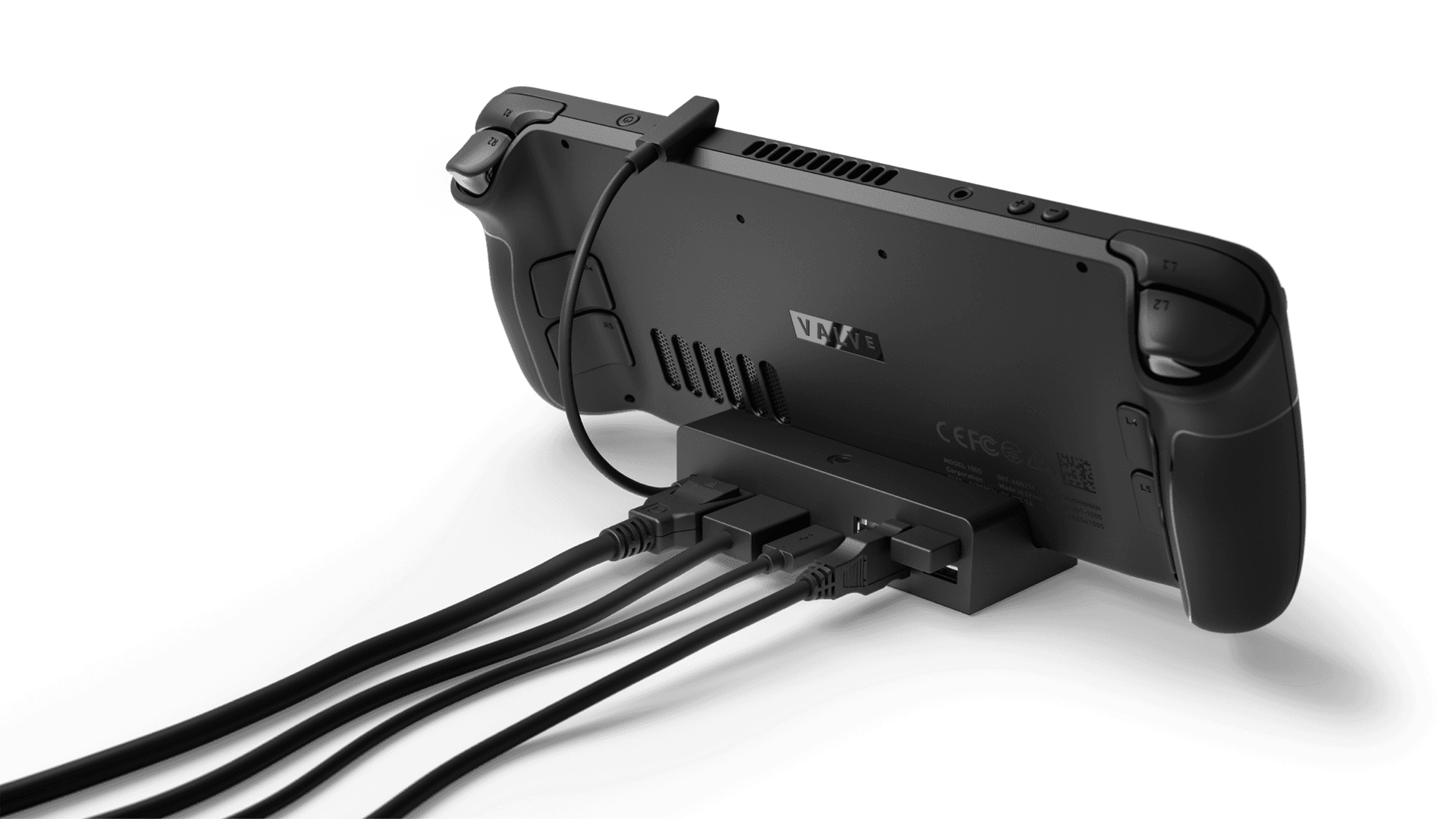
The official Nintendo dock for the Switch 2 is fine. It is also expensive for what it does. A third-party dock takes the same USB-C signal, relays the same video over HDMI, delivers the same power back to the device, and adds the USB-A ports and Ethernet that the first-party dock leaves out. That is not complicated hardware. A well-specified hub does the job just as cleanly as a branded unit, and the saving funds something else on this list.
JSAUX Universal Handheld Dock (around £35 / $40): a six-in-one hub with HDMI 2.0 (4K at 60 Hz), two USB-A 3.0 ports, a USB-C data port, gigabit Ethernet, and USB-C power delivery up to 100 W. Works across the Switch 2, Steam Deck, ROG Ally X, and Legion Go S without device-specific firmware. Stays cool over a long evening. Trade-off: 4K at 60 Hz is what the dock is capable of, not what every device delivers through it. The Steam Deck outputs 4K at 30 Hz over its USB-C, which is a Deck limit, not a dock limit. The ROG Ally X handles the full 4K at 60 Hz comfortably. Check your device’s DisplayPort alt-mode spec before expecting the headline number. Find the JSAUX dock on Amazon US.
If you mostly play on the Nintendo Switch 2, the docking story is simpler. Nintendo’s hardware uses standard DisplayPort alt-mode at 4K / 60 Hz, and any USB-C hub rated for that handles it cleanly. The compatibility nervousness around third-party docks belongs to the original Switch era and does not carry over.
Power Banks
Battery anxiety on a handheld is a watt calculation, not a milliamp-hour one. The Steam Deck OLED ships with a 50 Wh battery. The ROG Ally X has 80 Wh. The Switch 2 has roughly 19 Wh. A 24,000 mAh power bank at 3.7 V is 88.8 Wh on the spec sheet. After conversion losses through the USB-C charging circuit (call it 80 per cent real-world efficiency), that delivers around 71 Wh of usable energy to a connected device. In practical terms: one full charge of the ROG Ally X with 85 per cent of a second left over, or nearly two full Switch 2 charges back to back, or 1.4 full Steam Deck OLED charges. That is enough to outlast a long-haul flight.
Anker 737 Power Bank (around £100 / $110, 24,000 mAh, 140 W max output): charges the Steam Deck OLED at its full 45 W rate, the ROG Ally X at up to 65 W, and the Switch 2 at 45 W simultaneously alongside a second USB-A device. The display on the side shows percentage and current wattage in real time, which removes the guesswork about whether the bank or the device is being more aggressive. Trade-off: 626 g. You feel that in a commuter bag. It belongs in a travel backpack or on a flight, not a jacket pocket. Find the Anker 737 on Amazon US.
If 626 g in your bag is a non-starter, a 10,000 mAh 30 W option (several brands ship one in the £20 / $25 range) delivers about half a charge to the Deck or a full charge to the Switch 2 at under 230 g. The trade-off is the slower charge rate. At 30 W the Deck charges slowly while you play under load, where the Anker 737 at 65 W keeps pace with what the device draws. For commuting, the lighter bank is enough. For travel, the heavier one earns its place.
Storage and microSD
Storage looks different on different devices. The Switch 2’s microSD Express slot wants an SD Express card to give you the fast load times Nintendo’s first-party titles use. A regular microSD card fits and works, but reads at the older UHS-I speed of 40 to 50 MB/s sequential, against the 800 MB/s the Express format can hit. You will not feel the difference in every game. You will feel it in titles that stream open-world assets, where the regular card spends a couple of seconds loading where the Express finishes in less than one. The Steam Deck OLED and ROG Ally X both use M.2 2230 SSDs internally, so storage upgrades are a hardware swap rather than a card slot. An external microSD is cheaper and simpler for the Deck if you just need extra space without opening the device.
Samsung PRO Plus microSD Express 1 TB (around £90 / $100): rated up to 800 MB/s sequential read in SD Express mode, compatible with the Switch 2’s slot. At 1 TB it holds the full Switch 2 launch catalogue and more without you cycling games on and off. Trade-off: the speed advantage only applies in the Switch 2 and other devices with SD Express readers. In a standard reader, including the Deck, it reads at UHS-I speeds. Buying this for a Steam Deck is a waste of money. A standard microSD at £20 does the same job there. Find the Samsung microSD Express on Amazon US.
Samsung 990 Pro M.2 2230 SSD 1 TB (around £75 / $80): the right storage upgrade for the Steam Deck OLED or ROG Ally X if you want internal expansion. Sequential reads around 7,450 MB/s, a meaningful step up from the stock SSD in base-model Decks. Installation needs a Torx T8 screwdriver. Valve’s iFixit partnership makes the procedure officially supported on the Deck. Trade-off: this is a hardware swap, not a plug-and-play upgrade. If opening the device is not something you fancy, a high-capacity standard microSD in the Deck’s expansion slot does the job for less hassle. Find the Samsung 990 Pro 2230 on Amazon US.
Grip Cases and Ergonomic Shells
Grip cases solve a real fatigue problem. Handheld sessions over 45 minutes put sustained load on the outer fingers of both hands, which are not positioned well around a flat slab. An ergonomic shell reshapes the back of the device into something closer to a controller contour, which brings the grip points nearer the palm and reduces the pinching force you have to apply to hold the thing up. For the Switch 2 in particular, where the shoulder buttons already sit at an awkward reach, a grip case can also deepen the button recess and make those triggers usable for longer.
Skull & Co. NeoGrip for Switch 2 (around £22 / $25): a TPU shell that wraps the Switch 2’s back plate and adds palm-grip wings without adding more than 80 g to the device. The textured finish holds in sweaty hands, which is a practical concern most accessory copy ignores. Compatible with the Switch 2 while the Joy-Cons are attached, and removes in seconds. Trade-off: it adds a few millimetres of depth that some first-party Nintendo cases do not accommodate, so if you use an official carrying case it may not zip closed with the grip on. Pair it with the Tomtoc above instead. Find the Skull & Co. NeoGrip on Amazon US.
For the Steam Deck and the ROG Ally X, purpose-designed grips are less necessary because both devices already ship with a controller-shaped form factor. A textured skin or a roll of grip tape (£8 to £15) gives you the sweat management without the extra weight, and that is usually enough.
Wireless Earbuds and Headphones
Audio on handhelds is a divided story. The Switch 2 has Bluetooth audio built in, and any earbuds pair cleanly with no friction. The Steam Deck and the ROG Ally X both support Bluetooth audio natively under SteamOS and Windows respectively, but the latency varies by codec, and on a rhythm game that lag is the difference between in-time and just-off. A wired 3.5 mm connection on the same earbuds removes the latency completely, which is why earbuds with both options remain the most flexible buy. Our Steam Deck vs ROG Ally X vs Switch 2 comparison covers audio output in more detail.
Anker Soundcore Liberty 4 NC (around £70 / $80): noise-cancelling earbuds with LDAC codec support (the highest-quality Bluetooth audio format currently available in consumer earbuds), a 10-hour case-battery life at moderate volume, and a 3.5 mm wired cable in the box. LDAC delivers 990 kbps over Bluetooth, close to CD quality. Trade-off: LDAC requires the source device to support the codec. The Steam Deck under SteamOS supports it. The Switch 2 is capped at SBC and AAC, so the LDAC advantage does not apply on Nintendo’s hardware. On a Switch 2 you are paying for the noise cancellation and the form factor, and those are still worth the money for a flight or a busy carriage. Find the Anker Soundcore Liberty 4 NC on Amazon US.
For a desk session or a long sofa stint, over-ear noise-cancelling headphones at the £80 to £150 mark (Sony WH-1000XM5 and Bose QuietComfort 45 alternatives are the obvious shortlist) give better passive isolation and longer per-charge runtime, at the cost of portability. Earbuds win for the bag. Over-ear wins for the sofa. Both are valid; one of each is not extravagant.
Stands and Travel Surfaces
A stand solves a specific deskless-gaming problem. When you want to play at a table without holding the device, or prop it up on an aeroplane tray table, the Switch 2’s built-in kickstand works in a fixed position and the Steam Deck has no kickstand at all. A compact aluminium stand at £10 to £20 with an adjustable hinge lets you set any handheld between 30 and 70 degrees, which is the comfortable viewing range for a 60 to 80 cm distance. That is most kitchen tables and most train tables.
Ugreen Adjustable Tablet Stand (around £12 / $15): folding aluminium, rated for devices up to 1.2 kg, compatible with every current handheld. Folds flat to 10 mm thickness so it disappears into a side pocket. Holds its angle without creeping during button inputs, which is the single failure mode that ruins cheaper stands. Trade-off: it is another object in the bag. If you already use a carrying case with a built-in kickstand loop, the stand might duplicate what you have. Find the Ugreen tablet stand on Amazon US.
For aeroplane use specifically, a small bean bag stand (around £8 / $10) works on the uneven tray tables where a flat-base stand rocks. It looks less polished and works better. That is a reasonable trade for a fourteen-hour flight.
Operator-Grade Tip: The Most Underrated Accessory
The cheapest upgrade on this list is a high-quality USB-C cable, and most handheld owners do not own one. The cables that ship with devices are typically rated at USB 2.0 speeds, which is fine for charging and completely inadequate for DisplayPort alt-mode dock connections. When the dock fails to output video at full resolution, or flickers when the device is under load, the cable is usually the fault, not the dock. A USB-C cable rated for USB 3.2 Gen 2 (10 Gbps) or USB4 carries both the power and the data bandwidth the dock needs. The Anker 765 USB-C to USB-C Cable at around £14 / $16 for 1.8 m is rated for 140 W charging and USB 3.2 Gen 2 data, holds up to repeated coiling, and the cable ends are rated for 25,000 bend cycles. That is the cable that lasts. Replace the one that came in the box before you replace the dock. Find the Anker 765 USB-C cable on Amazon US. The full 2026 PC accessories guide covers desk-side cable management in more detail if a permanent setup is on your list.
What You Can Skip
External cooling fans for handhelds are mostly pointless. The Steam Deck OLED, the ROG Ally X, and the Switch 2 all manage their own thermals through performance scaling and internal fans. A clip-on external fan cannot reach the chip. What it can do is cool the outer shell, which makes the device feel slightly less warm in your hand and does nothing for sustained performance. Spend the £20 on a case or a cable.
Aftermarket thumb stick caps over £10 are a similar story. The Switch 2’s Joy-Con sticks and the Deck’s sticks both have reasonable factory texture. Premium caps change the tactile feel and the profile height, but they do not improve precision, and on the Deck they can interfere with grip-shell fit. The £5 to £8 sets do exactly the same job if you find the stock height uncomfortable. Screen protector films are in the same place: a tempered glass protector at £10 is fine. A £35 anti-glare matte glass protector for a Steam Deck OLED or a Switch 2 is buying a feature the hardware already has, since both devices already ship with etched anti-glare glass on the higher-tier panels.
Frequently Asked Questions
Do third-party docks damage the Nintendo Switch 2? Third-party docks do not damage the Switch 2 provided they are USB-C compliant and rated for USB Power Delivery at 45 W. The early warnings about dock damage applied to the original Switch, where some docks pushed voltage irregularly over a non-standard USB-C implementation. The Switch 2 uses a standard USB-C port, and any dock that correctly implements PD charging is safe. Stick to docks from manufacturers with consistent build reputations and check the power delivery spec matches Nintendo’s charging requirement.
What is the best power bank for the Steam Deck OLED? The best power bank for the Steam Deck OLED is one with at least 45 W USB-C PD output, which matches the Deck’s maximum charging rate. At 45 W the Deck charges fully in roughly 90 minutes while off, or holds steady during moderate gaming. A 20,000 mAh bank at 3.7 V holds around 74 Wh, which after conversion losses delivers about 1.2 full charges to the Deck’s 50 Wh battery. The Anker 737 at 24,000 mAh and 140 W output buys you more reserve, faster delivery, and the headroom to charge a phone alongside it.
Can I use any microSD card in the Nintendo Switch 2? Any microSD card fits and works in the Switch 2, but only microSD Express cards unlock the faster SD Express read speeds that some first-party titles use for asset streaming. A standard UHS-I card reads at around 40 to 50 MB/s. An SD Express card reads at up to 800 MB/s. For most games the gap is invisible. For large open-world titles with visible streaming load times, the faster card cuts the wait. The slot is the same; the speed difference lives inside the card’s controller.
Is a grip case worth it for the Steam Deck? A grip case is less essential on the Steam Deck than on the Switch 2 because the Deck already has a controller-shaped form factor with grip-like contours on the rear. Where a grip earns its place on the Deck is protection: a TPU shell absorbs minor drops and the everyday scratches that reach the body otherwise. If your Deck travels without a hard case, a grip is a reasonable precaution. If it lives inside a hard case, the grip is doing less work.
What USB-C cable should I use with a handheld dock? Use a USB-C cable rated for USB 3.2 Gen 2 (10 Gbps) or USB4, not the cable that ships with the device. The bundled cable on most handhelds is USB 2.0, which carries power but does not handle DisplayPort alt-mode at the bandwidth a 4K dock needs. A USB 3.2 Gen 2 cable like the Anker 765 fixes most dock video issues and handles 100 W or higher power delivery in the same cable. The cable is the most common point of failure when a dock gets the blame.
Do wireless earbuds work with all handhelds? Wireless earbuds work over Bluetooth on the Switch 2, the Steam Deck, and the ROG Ally X. The latency varies by codec. SBC at the baseline runs around 40 ms of added audio delay. AAC sits at 20 to 40 ms. LDAC at its highest quality runs around 30 ms. For most games none of those delays are noticeable. Rhythm games with tight audio sync are the exception, and for those a 3.5 mm wired connection is the answer. The Steam Deck supports LDAC under SteamOS, which is the highest-quality wireless option on the device. The Switch 2 caps at AAC.
Where to Buy
Every headline pick above is on Amazon US. For easy reference:
- Tomtoc Carrying Case (cases)
- JSAUX Universal Dock (docks)
- Anker 737 Power Bank (power)
- Samsung microSD Express 1 TB (storage, Switch 2)
- Samsung 990 Pro M.2 2230 SSD (storage, Deck and Ally X)
- Skull & Co. NeoGrip (grip cases)
- Anker Soundcore Liberty 4 NC (audio)
- Ugreen Adjustable Stand (stands)
- Anker 765 USB-C Cable (cables)
UK pricing fluctuates at Amazon.co.uk and the manufacturers’ own storefronts. The price estimates above are typical retail as of April 2026. Check current listings before ordering.