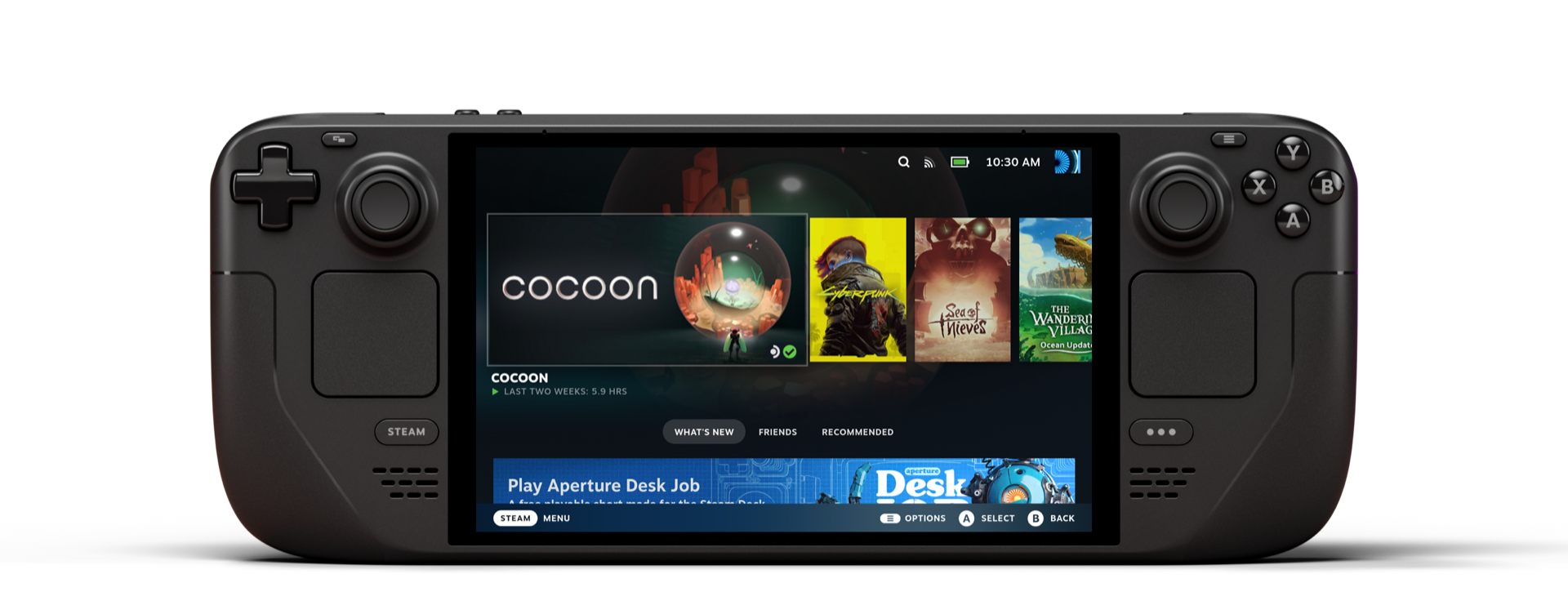
The screen is what changes the device, but it is not the only thing. The Steam Deck OLED answers most of what the LCD original got wrong, and the answers are the practical ones: better battery, better Wi-Fi, a quieter fan. Cyberpunk 2077 at 800p, Medium settings, FSR Quality, 10W TDP, capped at 30 fps now runs cool enough that the back of the device stays comfortable through a two-hour session. That is the update. This is the version of Valve’s handheld you should be buying in 2026, and its main competition has shifted significantly since launch. For a full picture of where it fits in the current field, our 2026 handheld gaming roundup covers all the major alternatives.
Product Snapshot
| Brand / Model | Valve Steam Deck OLED |
| Category | Handheld gaming PC |
| UK Price | £479 (512 GB) / £569 (1 TB) |
| US Price | $549 (512 GB) / $649 (1 TB) |
| Release Date | 16 November 2023 (still on sale 2026) |
| APU | Custom AMD “Aerith Plus” (Zen 2 quad-core, 8 threads, 6nm) |
| GPU | RDNA 2, 8 compute units at up to 1.6 GHz |
| Display | 7.4-inch HDR OLED, 1280×800, 90 Hz refresh |
| RAM | 16 GB LPDDR5 (6,400 MT/s) |
| Storage | 512 GB or 1 TB NVMe SSD (M.2 2230, user-replaceable) + microSD slot |
| Battery | 50 Wh, 3 to 12 hours depending on TDP and title |
| OS | SteamOS 3 (Arch-based, with Desktop Mode) |
| Weight | 640 g |
| Connectivity | Wi-Fi 6E, Bluetooth 5.3, USB-C 3.2 (DisplayPort 1.4 alt mode) |
| Best Alternatives | ROG Ally X, Lenovo Legion Go S, Switch 2 |
Design and Build
At 640 g, the Steam Deck OLED is heavier than the Nintendo Switch 2 and heavier than any pocket-sized alternative, but the weight distributes across deep rear grips that make extended sessions more manageable than the number suggests. The rear paddle buttons sit naturally under the ring fingers, and the trackpads give pointer-heavy PC games a control surface that controller-only handhelds cannot match. Two hours is comfortable for most adult hand sizes. Three hours brings fatigue to the shoulders and thumbs. This is a device for focused sessions, not all-day carry.
The OLED revision trimmed 30 g from the LCD original and uses a magnesium alloy frame that the original lacked. The front face is dominated by the 7.4-inch panel with reduced bezels; the button layout is unchanged. The power button doubles as a fingerprint reader for PIN-free Desktop Mode login. Dock compatibility is straightforward: the OLED works with the official dock and most USB-C hubs carrying DisplayPort 1.4 alt mode, pushing up to 4K at 60 Hz to an external display.
Build quality is functional and honest. The plastic exterior is not premium, but button tolerances are tight, the analogue sticks use capacitive touch detection for menu navigation, and the thumbstick rings are textured in a way that reduces slip during long thumb-travel inputs. Hall effect sensors are not present, but stick drift has not been a documented failure mode on the OLED revision at scale.
Performance
The Aerith Plus APU is a 6nm revision of the original Aerith chip with the same Zen 2 cores and RDNA 2 compute unit count. The headline change is efficiency: same workloads, lower thermals, later fan engagement, longer battery. Peak performance relative to the LCD Deck is similar. The improvement is in sustained headroom.
In practice, targets break down cleanly by game class. Cyberpunk 2077 at 720p, Medium, FSR Quality, 10W TDP cap holds a stable 30 fps over two hours with the device warm but not hot. Baldur’s Gate 3 at 800p Low, 12W cap targets 40 fps and delivers it for most of the game, dropping to 35 in dense Act 3 outdoor scenes. Hades II locks at 60 fps at 6W, which is the commute configuration: six watts steady gives around 4.5 hours per charge. Elden Ring at 800p Medium, 12W, 30 fps cap runs cleanly through open areas and stutters briefly on level transitions. That stutter is a shader compilation artefact; it settles after the first traversal of each zone.
The operator-grade tip: install CryoUtilities 2.x via Desktop Mode. Open a browser, go to github.com/CryoByte33/steam-deck-utilities, download the installer, run chmod +x && ./cryo_utilities.sh from the terminal, then select Recommended Settings. The preset increases the swap file to 16 GB, drops swappiness from the default 100 to 1, and enables huge-pages memory allocation. In practice, Elden Ring’s level-transition stutter drops from 1.5 seconds to under half a second, and Baldur’s Gate 3 Act 3 outdoor scenes hold the 40 fps cap without the frame-time spikes the default configuration allows. Reboot after applying. Verify with swapon --show in a terminal to confirm the swap size changed.
The GPU ceiling shows in the most demanding 2025 titles. Alan Wake 2 at 720p Low, FSR Performance, 15W TDP targets 30 fps and mostly holds it, but the device runs warm enough at 15W that the rear grips become uncomfortable after around 45 minutes. Cap TDP at 12W, drop one settings tier, and let FSR carry the resolution: the quality difference between FSR Quality and FSR Performance at 720p on a 7.4-inch panel is smaller in practice than it reads on paper.
Display
The 7.4-inch HDR OLED panel is the most visible improvement over the LCD original, and it earns the attention it receives. Blacks are absolute: in the opening tunnels of Elden Ring, or the darker indoor environments of Baldur’s Gate 3, the contrast between lit and unlit areas is the kind of thing an LCD cannot reproduce because its backlight cannot switch off at pixel level. Colour volume is wider than the LCD’s sRGB output, covering closer to DCI-P3, which shows most clearly in the warm sunset palettes of open-world titles and the neon environments of cyberpunk settings. The 90 Hz refresh rate matters less than the black level for most game genres, but it is the right choice for anything above 60 fps: Hades II at 90 fps with a 90 Hz cap is visibly smoother than the same game at 60 Hz on the LCD original.
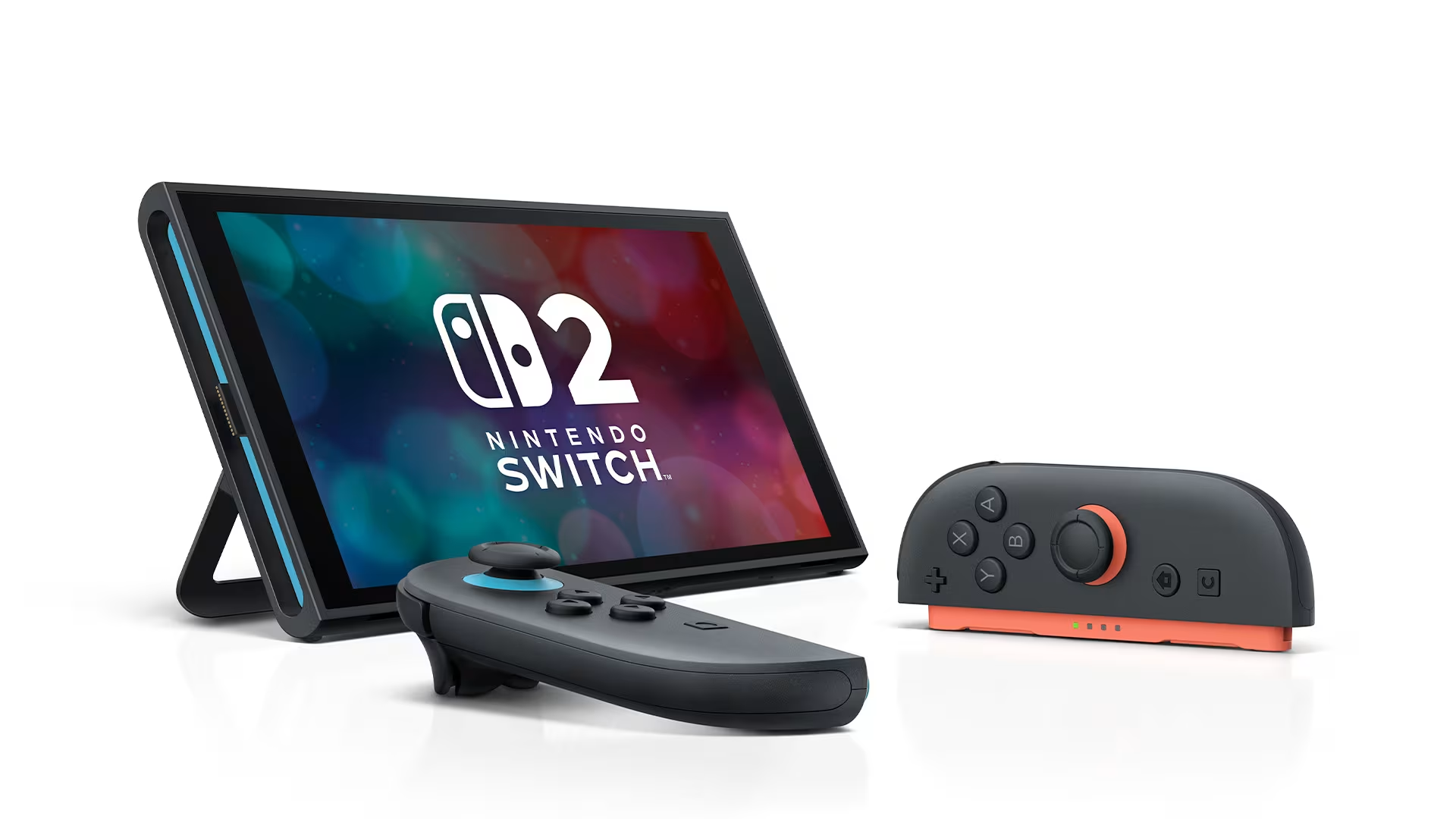
Against the Switch 2’s 7.9-inch LCD at 1080p, the comparison is straightforward for indoor and evening use: the Deck OLED’s panel produces a more striking image in dim environments because the contrast advantage overwhelms the Switch 2’s resolution advantage at handheld viewing distance. In bright rooms or outdoors, the Switch 2’s higher peak brightness and 1080p clarity pull ahead. These are genuinely different panels optimised for different conditions, and the right choice depends on where you play, not on which number is larger.
Battery and Thermals
The 50 Wh battery is the largest improvement the OLED brings that does not appear in display comparisons. At 6W TDP (Hades II, 60 fps), expect around 5.5 hours of play, which is a full working day’s commute on a single charge. At 10W TDP (Cyberpunk 2077, 30 fps), the realistic figure is 3.5 to 4 hours, which covers a return train journey without needing to carry a power bank. At 15W TDP (Alan Wake 2, demanding titles), the battery drops to 2 to 2.5 hours, which is less than the LCD original at the same TDP. The 50 Wh cell is larger, but the more demanding workloads at 15W+ draw enough current to offset the capacity gain. Plan accordingly: the OLED’s battery advantage is most pronounced in the 6W to 12W range, where efficiency improvements compound.
Thermals are genuinely better than the LCD model. The fan on the OLED uses a redesigned impeller that Valve describes as having a more complex blade geometry. The result in use is that the fan reaches audible levels around the 12W mark rather than the 8W mark on the original. At 10W TDP, the device runs quietly enough to use in a train carriage without drawing attention. At 15W, the fan is audible at arm’s length on a quiet train. The rear of the chassis gets warm, centred on the upper-right exhaust vent area, but not hot enough to be uncomfortable in the standard playing grip. Sustained 15W sessions beyond an hour push the rear temperature into a range that some users will find distracting; 12W is the better sustained ceiling for comfort and noise.
Software Experience
SteamOS 3 is the device’s clearest competitive advantage over Windows-based handhelds. Game Mode is a controller-first interface: launch games, manage saves, handle suspend and resume without a keyboard or mouse. Suspend-resume is reliable; close the device mid-session, open it on the train, and the game is where you left it within eight seconds. The equivalent experience on a Windows handheld involves wake-from-sleep unpredictability and audio routing failures that SteamOS does not have. That reliability is why the Deck works as a travel device.
Desktop Mode unlocks the full Arch Linux desktop, and that is where the friction lives. Installing Heroic Games Launcher for Epic and GOG titles takes around ten minutes via the Discover software centre and works reliably once done. Epic titles run through Proton, Valve’s Windows compatibility layer; the hit rate on modern titles is high but not universal. Titles with kernel-level anti-cheat (certain online shooters) do not run. For the Steam library and much of the Epic catalogue, compatibility is no longer the barrier it was at the Deck’s 2022 launch.
The Decky Loader plugin ecosystem sits in Desktop Mode and extends Game Mode with per-game TDP profiles, MangoHud performance monitoring, and fan curve control. It installs via a one-command terminal script. For buyers who want a clean out-of-box experience, SteamOS delivers that without Decky; for buyers who want per-game profiles that load automatically on launch, Decky’s SimpleDeckyTDP plugin is worth twenty minutes to set up. Both audiences are catered for. More context on the Deck’s position in the portable PC landscape is in our PC accessories guide for 2026.
Who It’s For / Who Should Skip It
Buy it if:
- You have a large Steam library and want to play it on the train, in bed, or at a desk away from your PC, without setting up a streaming solution.
- You are a PC player who wants portability without giving up your existing purchases, and you are comfortable spending twenty minutes in a terminal when the situation requires it.
- You play RPGs, strategy games, or indie titles that map well to a controller and run at 30 to 60 fps on modest hardware, where the OLED panel makes every session more enjoyable than a laptop screen.
- Battery life for commutes is the priority: at 10W TDP, 3.5 to 4 hours of Cyberpunk 2077 covers the daily commute without needing a charge.
Skip it if:
- Your library lives entirely in the Epic or Game Pass ecosystem. The Deck can access both, but the setup friction is real and recurring updates occasionally break launcher compatibility.
- You want maximum graphical performance in handheld form. The ROG Ally X’s AMD Z1 Extreme APU produces meaningfully higher frame rates at equivalent settings, at the cost of a shorter battery and a less refined software experience.
- You primarily play Nintendo exclusives. The Steam Deck does not run first-party Nintendo software, and the Switch 2 is the only portable that does.
- You want the device to be plug-and-play for a child or someone unfamiliar with PC gaming. Desktop Mode and Proton compatibility require a baseline of patience that SteamOS does not fully paper over.
Alternatives
ROG Ally X (from £799 / $799): ASUS’s flagship handheld runs an AMD Z1 Extreme APU with a higher performance ceiling than the Aerith Plus: around 40 to 50 per cent more GPU output at 25W TDP, which means higher frame rates or higher settings in demanding titles. The trade-offs are real: Windows 11 suspend-resume is less reliable than SteamOS, and battery at 25W drains in under two hours. At 15W, the gap narrows. Raw performance favours the Ally X. Commute reliability favours the Deck.
Lenovo Legion Go S (from £499 / $499): Lenovo’s handheld ships in Windows and SteamOS configurations. The SteamOS version is a direct Deck competitor at a similar price: slightly larger 8-inch LCD, detachable controllers, similar performance envelope. Neither configuration matches the Deck’s OLED panel, and build tolerances are a step below Valve’s chassis.
Nintendo Switch 2 (£395.99 / $449.99): The Switch 2 is a hybrid console, not a handheld PC. It runs Nintendo first-party titles and a growing third-party port library in a closed ecosystem. The LCD panel at 1080p loses the contrast comparison to the Deck’s OLED in dim environments. For buyers who want Nintendo exclusives alongside PC gaming, these are complementary rather than competing devices. Our player-type buying guide maps the full 2026 field.
Scoring
Performance: 8.5/10. The Aerith Plus APU handles the majority of the Steam library at 30 to 60 fps with competent TDP tuning, but demanding 2025 titles at 15W push the thermal envelope to the edge of comfort.
Display: 9.5/10. The 7.4-inch HDR OLED at 90 Hz is the strongest handheld panel available for indoor and evening use, with absolute blacks and DCI-P3 colour volume that no LCD competitor in this price class matches.
Build and Ergonomics: 8.8/10. Deep rear grips, clean button tolerances, and a stable 640 g weight distribution make long sessions manageable; the plastic exterior is functional without being premium.
Battery and Thermals: 8.7/10. Around 3.5 to 4 hours at 10W TDP covers the daily commute, the fan is quiet below 12W, and the 50 Wh cell is the largest in the Deck line to date.
Value: 9.0/10. At £479 / $549 for the 512 GB model, with access to the full Steam library and a no-compromise OLED panel, the price-to-experience ratio is the best in the handheld PC category.
Average: 8.9/10.
Verdict
The Steam Deck OLED is the version of Valve’s handheld that the original promised. The OLED panel is the headline, but the longer battery, quieter fan, and improved Wi-Fi 6E connectivity are the changes that alter the daily experience. At 10W TDP, Cyberpunk 2077 at 800p holds 30 fps for almost four hours per charge, with the device quiet enough for a train carriage and cool enough for two hours of comfortable play in the hand. That is the test that matters for a commute device, and the OLED passes it where the LCD original only managed it on lighter titles. The platform still requires patience for Epic and GOG titles, and the most graphically demanding 2025 games push the APU hard enough that 30 fps is the realistic ceiling, not a tuning choice. These are the costs of the hardware, not bugs.
Decision rule: if you have a Steam library and want the best handheld panel for commuting and evening play, buy the OLED; if you want maximum raw performance in a handheld and are willing to manage Windows, consider the ROG Ally X instead; if Nintendo exclusives are part of your library, the Switch 2 is a different device serving a different purpose and the two can coexist. Our industry context piece covers where each platform is heading through 2027.
Where to Buy
FAQ
Is the Steam Deck OLED worth buying in 2026? The Steam Deck OLED is worth buying in 2026 if you have a Steam library and want a handheld that handles commutes and travel without a streaming dependency. The OLED panel, 50 Wh battery, and Wi-Fi 6E are the three improvements over the LCD original that affect daily use most directly. Competition has intensified, but no device in the sub-£500 range combines the panel quality and SteamOS reliability of the Deck OLED.
How does the Steam Deck OLED compare to the ROG Ally X? The ROG Ally X delivers around 40 to 50 per cent more GPU performance than the Steam Deck OLED at 25W TDP, which translates to higher frame rates or higher settings on demanding titles. That advantage costs battery life (closer to two hours on demanding titles at 25W versus 3.5 hours on the Deck at 10W) and software reliability, where Windows 11 suspend-resume is less consistent than SteamOS. The Ally X wins on raw performance. The Deck wins on commute dependability. The £320 / $250 price gap further separates the two.
Is the Steam Deck OLED better than the Switch 2? The Steam Deck OLED and Switch 2 serve different libraries and different use cases. The Deck OLED has a stronger panel in dim environments (OLED absolute blacks versus LCD lifted greys), access to the Steam and PC catalogue via Proton, and per-game TDP tuning. The Switch 2 offers Nintendo first-party exclusives, a cleaner plug-and-play experience, 1080p handheld output, and dock output up to 4K. Read our full Switch 2 review for the detailed comparison. For most PC-first players, these are complementary devices.
What is the battery life of the Steam Deck OLED? Battery life varies directly with TDP setting: around 5.5 hours at 6W TDP (Hades II, 60 fps), 3.5 to 4 hours at 10W TDP (Cyberpunk 2077, 30 fps), and 2 to 2.5 hours at 15W on demanding titles. The 50 Wh cell is larger than the LCD original’s 40 Wh, and the 6nm efficiency improvement means the battery advantage is most pronounced at the lower TDP settings where commuting most commonly lands.
Can I play Cyberpunk 2077 on the Steam Deck OLED? Cyberpunk 2077 runs well on the Steam Deck OLED with the right profile: 800p, Medium settings, FSR Quality, 10W TDP, 30 fps cap. At those settings the device holds 30 fps through most of Night City, draws around 10W average, and gives roughly 3.5 hours per charge. Applying the CryoUtilities recommended settings preset in Desktop Mode beforehand reduces frame-time variance in open-world areas, making the 30 fps cap feel steadier in practice.
Does the Steam Deck OLED play non-Steam games? The Steam Deck OLED plays non-Steam games through Desktop Mode and third-party launchers. Heroic Games Launcher handles Epic and GOG libraries via the Discover software centre (around ten minutes to install). GOG titles run at a high compatibility rate. Epic titles run through Proton, with most major releases working and kernel-level anti-cheat titles the main exceptions. Lutris covers additional storefronts and emulators. The process requires time in Desktop Mode; it is not plug-and-play in the way Steam titles are.
How loud is the Steam Deck OLED’s fan? The fan is quiet at or below 10W TDP: inaudible in a normal room, unobtrusive on a train. At 12W it becomes faintly audible at arm’s length on a quiet commute but stays below background noise in most environments. At 15W it is audible and noticeable to someone nearby. The OLED’s redesigned impeller is meaningfully quieter than the LCD original at equivalent TDP, meaning the same game at the same settings runs quieter on the newer hardware.
Is SteamOS hard to use? SteamOS is straightforward for anyone familiar with a games console. Game Mode is a controller-driven interface that launches games, manages saves, and handles suspend and resume (close the device, open it later, the game resumes within eight seconds) without a keyboard or mouse. Desktop Mode adds Linux desktop access for non-Steam software, and that is where the learning curve starts: Heroic Launcher, CryoUtilities, and Decky Loader all require Desktop Mode. For Steam-only play, none of that is necessary. Twenty minutes in Desktop Mode covers most of what the platform can do beyond that.
Please note that some links in this article are affiliate links. If you found the coverage helpful and decide to pick up the game, or anything else for your collection, through one of those links, we may earn a commission at no extra cost to you. We use this approach instead of filling Spawning Point with intrusive display ads, and rely on this support to keep the site online and fund future reviews, guides, comparisons and other in-depth gaming coverage. Thank you for supporting the site.