If the best laptop for most people means the longest battery life, the lightest chassis, and a chip fast enough to handle anything short of professional video rendering or sustained GPU workloads, the MacBook Air M5 is the answer for 2026. Apple has not redesigned the body or upgraded the display, and at £1,099 it costs £100 more than its predecessor. What it has done is double the SSD speed, push Wi-Fi 7 into a machine this thin, and deliver an 11 per cent CPU improvement that, for the vast majority of buyers, will never become a bottleneck. The result is an ultraportable that quietly extends its lead.
Product Snapshot
| Brand / Model | Apple MacBook Air M5 (2026) |
| Category | 13-inch and 15-inch ultraportable laptop |
| UK Price Range | £1,099 (13-inch base)/£1,299 (15-inch base); Education from £999/£1,199 |
| US Price Range | $1,099 (13-inch base)/$1,299 (15-inch base) |
| Release Date | On sale 11 March 2026 (announced 3 March 2026) |
| Chip | Apple M5 (10-core CPU: 4 performance + 6 efficiency) |
| GPU | 8-core (13-inch base) or 10-core (13-inch upgraded/all 15-inch) |
| Neural Engine | 16-core |
| Memory | 16GB unified memory (base); configurable to 24GB or 32GB |
| Storage | 512GB SSD (base); configurable to 1TB, 2TB, or 4TB |
| Display | 13.6-inch Liquid Retina, 2560×1664, 500 nits, P3 wide colour, True Tone, 60Hz |
| Camera | 12MP Centre Stage |
| Ports | 2x Thunderbolt 4, MagSafe 3, 3.5mm headphone jack |
| Wireless | Wi-Fi 7 (Apple N1 chip), Bluetooth 6.0 |
| Battery Life | 18 hours (Apple rated); 16h38m tested (Tom’s Guide) |
| Weight | 2.7 lbs/1.23kg (13-inch); 3.3 lbs/1.51kg (15-inch) |
| Colours | Sky Blue, Midnight, Starlight, Silver |
| Cooling | Fanless |
| Best Alternatives | MacBook Pro 14” M5, Dell XPS 14 (2026), Framework Laptop 13 |
Design and Build
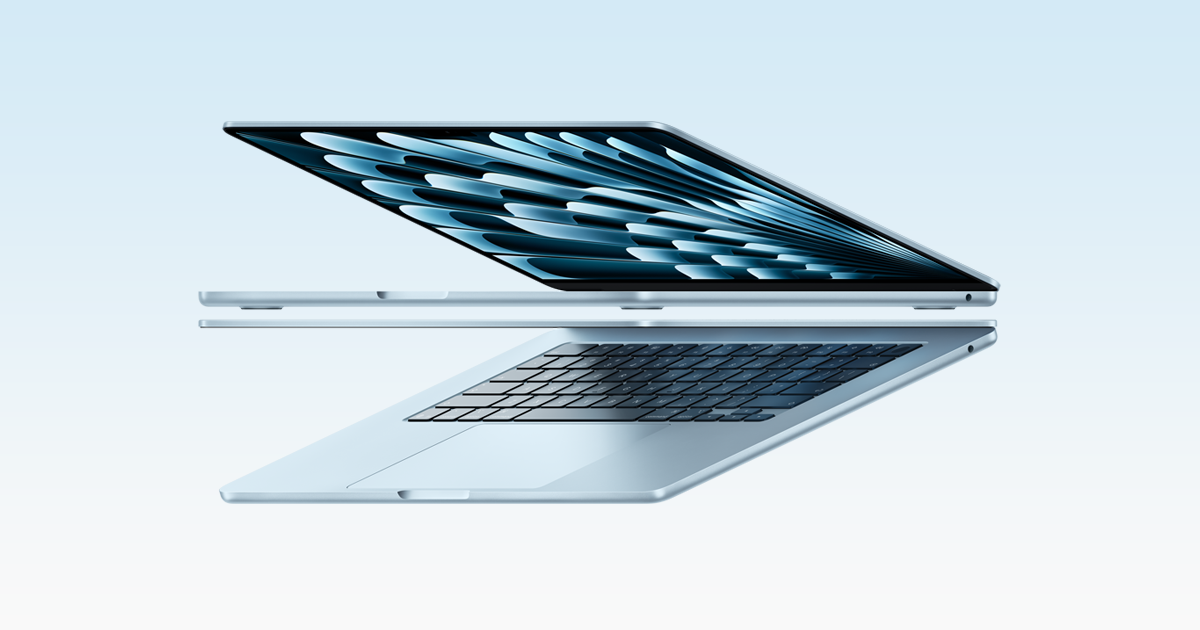
Nothing has changed. That is both the strength and the limitation of the MacBook Air M5’s chassis. The same anodised aluminium body that debuted with the M2 generation returns here, now available in Sky Blue alongside the familiar Midnight, Starlight, and Silver options. At 1.23kg, the 13-inch remains one of the lightest capable laptops on the market. The build quality is impeccable: no flex, no creaking, and a wedge profile that slips into a sleeve without effort.
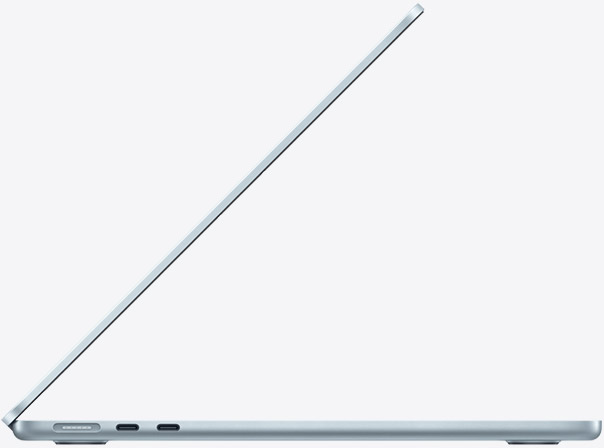
The keyboard and trackpad continue to set the standard for the category. Apple’s scissor-switch keyboard offers consistent travel and a layout that suits extended writing sessions, and the Force Touch trackpad is larger and more accurate than anything you will find on a comparably priced Windows ultrabook. The hinge is well-damped and one-finger operable.
The limitation is age. The notch remains. The display bezels are wider than those on the Dell XPS 14. And in a market where OLED screens have reached the mainstream at this price point, the MacBook Air’s IPS Liquid Retina panel is noticeably more conservative than what Samsung and Dell now offer. The design still works. It does not surprise.
Setup and Day-to-Day Usability
Setup is measured in minutes. Apple’s migration assistant transfers settings, files, and applications from a previous Mac without friction, and the M5’s Rosetta 2 translation layer handles the residual Intel applications that have not yet moved to native ARM builds. The 12MP Centre Stage camera tracks movement automatically during video calls, a feature that remains genuinely useful rather than a spec-sheet entry.
Day to day, the fanless design defines the experience. There is no audible response to open tabs, concurrent downloads, or light creative work. The machine stays quiet and cool through the tasks that most buyers perform most of the time. macOS Sequoia’s window tiling and improved Stage Manager reduce the cognitive load of working across multiple apps on a 13-inch screen, and iCloud integration makes the transition between iPhone, iPad, and MacBook almost invisible. The two-port limit does eventually surface: connecting power, an external display, and a peripheral simultaneously requires a hub.
Performance
The M5 chip is not a generational leap. It is a refinement. Approximately 11 per cent faster CPU performance over the M4 is enough to be measurable in benchmarks but rarely transformative in use. Where the M5 makes a more substantial argument is in AI tasks: Apple claims four times the machine learning performance versus M4, which matters for on-device inference, photography processing, and the expanding set of Apple Intelligence features. The Neural Engine processes requests locally, with no data leaving the device.
The SSD speed improvement is the most immediately practical upgrade. Apple has doubled throughput to approximately 6GB/s, which reduces import times for large media files and speeds up application launch in a way that daily users will notice.
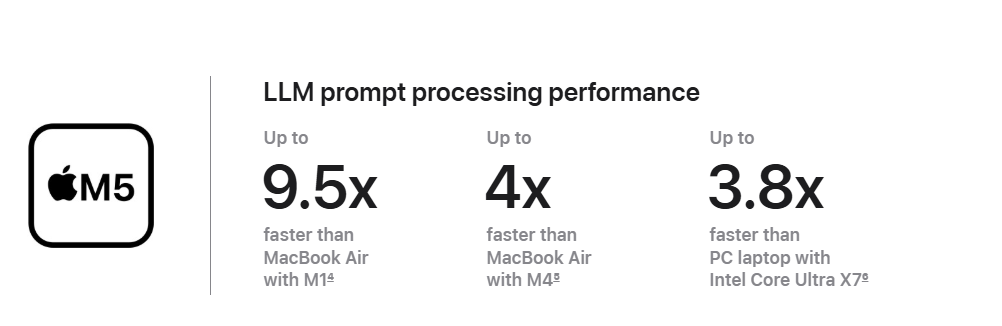
The thermal caveat is real and worth stating clearly. The MacBook Air M5 is fanless. Under sustained, intensive loads, the M5 throttles to protect itself: Cinebench multi-core scores drop from approximately 3,415 to approximately 2,300 over an extended run. For video encoding, extended Premiere Pro exports, and prolonged 3D rendering, this matters. For everything else, including web work, coding, light photo editing, document processing, and casual video playback, the chip never approaches its thermal ceiling and the fanless design remains a feature rather than a liability.
GPU performance follows the same pattern. Sustained GPU output is approximately 52 per cent of the M5 Pro’s in Premiere Pro workloads. The Air is not a video production workstation. It is a capable machine for occasional creative work, and an exceptional one for everything short of that.
Features and Software
Wi-Fi 7 is the headline connectivity upgrade. Apple’s custom N1 wireless chip delivers theoretical peak throughput well above Wi-Fi 6E, and in practice it means faster large-file transfers on compatible routers and more stable performance in congested wireless environments. The benefit compounds over time as Wi-Fi 7 infrastructure becomes more common.
Bluetooth 6.0 is similarly forward-looking rather than immediately transformative for most buyers.
Apple Intelligence is baked into the M5’s Neural Engine. Writing tools, image generation via Image Playground, priority inbox sorting in Mail, and on-device Siri requests all process locally. The practical benefit for most buyers is speed and privacy: AI-assisted tasks happen without a round-trip to a server. Centre Stage on the 12MP camera has matured across software updates and is now reliable enough to use without managing framing manually on calls.
The 60Hz display refresh rate is the software and features section’s quiet omission. The MacBook Pro’s ProMotion display at 120Hz is smoother for scrolling and animation. On the Air, the difference is visible if you look for it.
Connectivity and Compatibility
Two Thunderbolt 4 ports and MagSafe 3 is the full story. Thunderbolt 4 supports up to 40Gb/s data transfer, drives external displays at up to 6K, and powers high-speed docks. The presence of MagSafe means charging does not consume either data port, which is a practical advantage over the M2 Air’s early compromise.
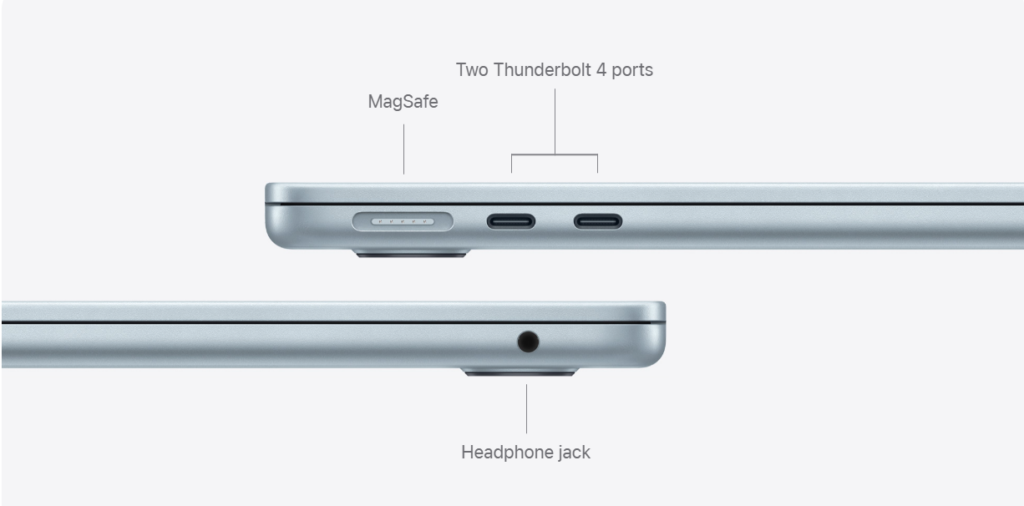
There is no SD card reader. There is no HDMI. Users connecting to projectors, external storage, or multiple peripherals simultaneously will need a hub or dock, and the two-port ceiling becomes a constraint once those needs accumulate. For buyers who travel with a single USB-C cable and a pair of wireless earbuds, it is irrelevant.
Wi-Fi 7 ensures the MacBook Air M5 is equipped for the next generation of wireless infrastructure. Compatibility with existing Wi-Fi 6 and 6E networks is full; the upgrade to Wi-Fi 7 simply adds headroom. Bluetooth 6.0 supports the latest AirPods and accessories. The machine works seamlessly with iPhone via Handoff, Universal Clipboard, and AirDrop, which remains a genuine convenience for buyers already in the Apple ecosystem.
Reliability, Support, and Warranty
Apple’s one-year limited warranty covers manufacturing defects. AppleCare+ extends this to three years with accidental damage cover (additional cost). The fanless design eliminates the most common mechanical failure point in portable computers. Apple’s service network is broad, with Genius Bar appointments available in most cities, and the M-series chips have accumulated a strong reliability record across the M1 through M4 generations. No persistent hardware defect has been associated with the M5 MacBook Air at time of writing.
Who It’s For / Who Should Skip It
Buy it if:
– You want the lightest capable laptop under 1.5kg and battery life that survives a full workday without hunting for a socket.
– Your workload is writing, web, coding, communication, light photo editing, or casual video watching.
– You are coming from an M1 or M2 MacBook Air and want a meaningful, across-the-board upgrade.
– You are a student who wants an education-discounted machine that will not need replacing before graduation.
– You are already in the Apple ecosystem and the Handoff, AirDrop, and Continuity Camera integrations matter to you daily.
Skip it if:
– You own an M4 MacBook Air. The performance delta does not justify the cost of switching.
– You need sustained GPU performance for professional video production. The MacBook Pro 14” M5 exists for that reason, at £500 more.
– You want an OLED display. Neither the 13-inch nor the 15-inch Air offers one, and competitors at this price now do.
– You need more than two ports without a hub. – You do daily heavy lifting in a Windows-native workflow and the ecosystem lock-in is a friction you do not want.
Alternatives
MacBook Pro 14” M5 (from £1,599/$1,599): The M5 Pro chip adds active cooling, eliminating throttling under sustained loads. ProMotion raises the display to 120Hz. HDMI, SD card slot, and three Thunderbolt 4 ports remove the hub dependency. At £500 more, it is the right machine for video editors, developers running virtualisation, and anyone who regularly hits the Air’s thermal ceiling. The weight penalty is modest.
Dell XPS 14 (2026) (from $1,599): Intel Panther Lake, a tandem OLED display option, and a broader port selection make this the strongest Windows competitor. Roughly $500 more than the base Air, heavier, and with Windows-native software assumptions. For buyers who cannot commit to macOS or need a specific Windows application, this is the serious alternative.
Framework Laptop 13 (from $1,049): Fully user-upgradeable RAM and storage, modular port selection, and a repairability philosophy that Apple cannot match. Performance sits below the M5, but the Framework trades raw speed for longevity: you replace the parts, not the machine. The right call for buyers who prioritise right-to-repair over ecosystem integration.
Verdict
The MacBook Air M5 is the best ultraportable for most people, again. Apple has not reinvented it. It has made the SSD faster, added Wi-Fi 7, improved the chip, and raised the price by £100. None of those changes are transformative in isolation. Together, they mean that a buyer purchasing the MacBook Air in 2026 is getting a machine that will remain capable for four or five years without feeling the strain. The display is not cutting-edge. The port count is a genuine constraint. Those are known positions, not surprises. For the buyer who wants silence, weight, battery life, and everyday speed without compromise, nothing at this price beats it.
FAQ
Is the MacBook Air M5 worth buying?
Yes, for most buyers. The MacBook Air M5 is the best ultraportable available at £1,099 if your workload falls within everyday computing: writing, web, coding, light creative work, and video calls. The doubled SSD speed, Wi-Fi 7, and improved battery life justify the price for a first purchase or an upgrade from M1 or M2. The £100 increase over the M4 generation is the only genuine friction for buyers on a tight budget.
Should I buy the MacBook Air M5 or M4?
Buy the M5 if you are purchasing new. If you already own an M4 MacBook Air, the improvement does not justify the cost of switching. The M5 delivers roughly 11 per cent more CPU performance, doubled SSD speed, and Wi-Fi 7 over the M4. Those are real gains for a new purchase but not enough to retire a machine that is one generation old and still performing well.
How long does the MacBook Air M5 battery last?
In real-world use, expect approximately 13 hours for a mixed workday of writing, web browsing, and video calls. Apple rates the M5 Air at 18 hours for video playback. Tom’s Guide’s structured battery test recorded 16 hours and 38 minutes. The practical figure depends on screen brightness, workload intensity, and wireless activity, but the MacBook Air M5 is among the longest-lasting laptops in its class without exception.
Is the M5 chip better than M4?
Yes, measurably if not dramatically. The M5 delivers approximately 11 per cent more multi-core CPU performance over the M4 and four times the machine learning performance, which benefits Apple Intelligence features and on-device AI tasks. The SSD throughput has roughly doubled to approximately 6GB/s. For sustained heavy workloads the fanless thermal design still applies the same ceiling. The M5 is a clear generational step forward; it is not a wholesale reinvention.
MacBook Air M5 vs MacBook Pro M5 — which should I buy?
Buy the MacBook Air M5 if your work stays within everyday creative and productivity tasks. Buy the MacBook Pro 14” M5 (from £1,599) if you edit video professionally, run virtualisation, or need sustained GPU performance without throttling. The Pro adds active cooling, 120Hz ProMotion display, HDMI, an SD card slot, and a third Thunderbolt 4 port. The extra £500 is spent on capability ceiling, not everyday use.
Does the MacBook Air M5 have an OLED display?
No. The MacBook Air M5 uses a 13.6-inch Liquid Retina IPS display at 2560×1664 resolution, 500 nits brightness, P3 wide colour, and True Tone. It does not offer OLED, and unlike the MacBook Pro it does not offer ProMotion high-refresh-rate scrolling. Competitors including the Dell XPS 14 now offer tandem OLED options at higher price points. The Air’s display is excellent for everyday use; it is not the choice for buyers who prioritise display technology above all else.
Can the MacBook Air M5 run games?
To a point. The 8-core or 10-core GPU handles casual gaming, indie titles, and older AAA games at moderate settings without issue. The M5’s GPU performance is capable for a fanless machine. Under sustained gaming loads, thermal throttling reduces performance over time as the chip protects itself without a fan to manage heat. The MacBook Air is not a gaming machine. For serious gaming on macOS, the MacBook Pro M5 with active cooling sustains higher performance for longer.
Is the MacBook Air M5 good for video editing?
For casual to intermediate video editing, yes. Final Cut Pro and iMovie run smoothly, and the M5 handles 4K timelines, colour grading, and multi-stream playback without fan noise. Extended export sessions under heavy codec loads will trigger thermal throttling, which slows sustained render times compared to the MacBook Pro. If video editing is your primary workload and timeline render speed matters daily, the MacBook Pro 14” M5 is the better investment.
What is the difference between the 13-inch and 15-inch MacBook Air M5?
The 15-inch model has a larger 15.3-inch Liquid Retina display and weighs 1.51kg versus 1.23kg for the 13-inch. All 15-inch models come with a 10-core GPU; the 13-inch base model uses an 8-core GPU (upgrading any spec on the 13-inch bumps it to 10-core automatically). Battery life is comparable between the two. The 15-inch starts at £1,299 versus £1,099 for the 13-inch. Choose the 15-inch if screen real estate matters more than minimum weight.
Is the MacBook Air M5 good for students?
It is one of the best student laptops available. At £999 with education pricing, the MacBook Air M5 offers full-day battery life, a silent fanless design, 512GB base storage, and a chip that will not feel slow by graduation. The combination of build quality, battery, and ecosystem integration (iPhone, AirPods, iCloud) suits student workflows. The two-port limit is manageable with a small USB-C hub, which is a minor addition to the total cost.
Does the MacBook Air M5 overheat?
It does not overheat in the conventional sense, but it does throttle under sustained loads. The fanless design means the M5 chip reduces its own clock speed to manage heat when pushed hard for extended periods. Cinebench multi-core performance drops from approximately 3,415 to approximately 2,300 over a sustained run. In everyday use, including web browsing, writing, coding, and light creative tasks, the chip operates well within its thermal limits and the chassis stays cool to the touch.
MacBook Air M5 vs Dell XPS 14 (2026) — which is better?
They serve different buyers. The MacBook Air M5 starts at £1,099 and offers exceptional battery life, a fanless design, and deep Apple ecosystem integration. The Dell XPS 14 (2026) starts at approximately $1,599, offers an optional tandem OLED display, Intel Panther Lake performance, and broader port selection, but costs roughly $500 more and runs Windows. Choose the Air for ecosystem, weight, and battery. Choose the XPS 14 for display quality, Windows workflows, and hardware flexibility at a higher entry price.
What ports does the MacBook Air M5 have?
The MacBook Air M5 has two Thunderbolt 4 ports (supporting data transfer up to 40Gb/s, external display output, and charging), one MagSafe 3 port for dedicated magnetic charging, and one 3.5mm headphone jack. There is no SD card slot, no HDMI port, and no USB-A. Users connecting peripherals, external storage, and displays simultaneously will need a USB-C hub or dock. MagSafe charging means both Thunderbolt ports remain free when connected to power.
Is 16GB RAM enough on the MacBook Air M5?
For most buyers, yes. Apple’s unified memory architecture means the M5’s 16GB performs differently from 16GB in a conventional system: memory is shared efficiently between CPU, GPU, and Neural Engine with low latency. Web browsing, productivity, coding, and light creative work run comfortably in 16GB. If you regularly run virtual machines, edit high-resolution video professionally, or keep dozens of tabs and applications open simultaneously, upgrading to 24GB at configuration is worth the additional cost. RAM cannot be upgraded after purchase.
Please note that some links in this article are affiliate links. If you found the coverage helpful and decide to pick up the game, or anything else for your collection, through one of those links, we may earn a commission at no extra cost to you. We use this approach instead of filling Spawning Point with intrusive display ads, and rely on this support to keep the site online and fund future reviews, guides, comparisons and other in-depth gaming coverage. Thank you for supporting the site.